 VibeCode
Usage and cost
You pay your model provider for the text that goes in and the text that comes out, counted in tokens. A token is a piece of a word; a thousand tokens is about 750 English words. The app shows what each project has used.
See what a project costs
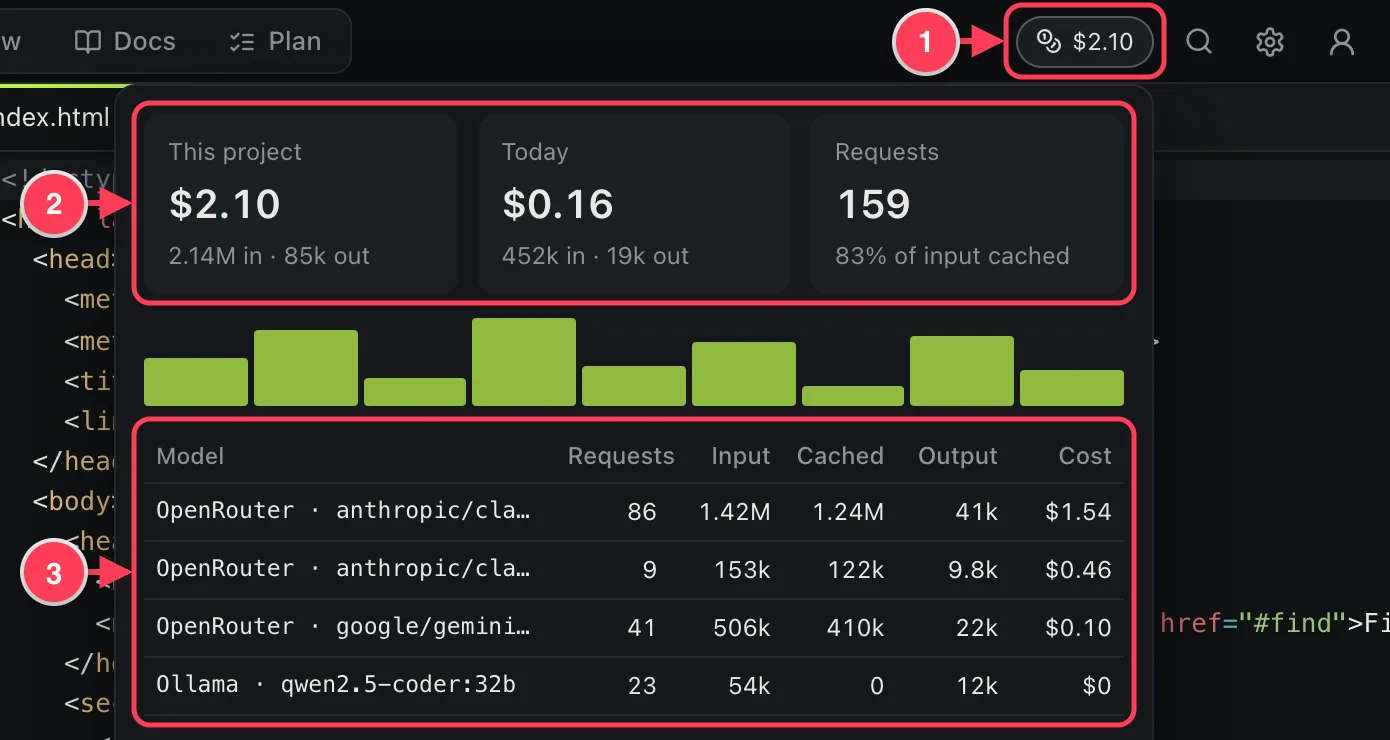
- The cost of this project so far. Click it.
- Totals for the project and for today, and the share of input that came from the cache.
- The same per model: requests, input, cached input, output and cost.
Each reply in the chat also shows its own line, such as “17k in (12k cached) · 1.8k out · $0.04”. The panel counts chat models only: images, voice and video are billed by their own providers and are not included. A model with no known price counts tokens but no dollars.
Why input is much larger than output
An agent works in steps. At every step the whole conversation so far is sent to the model again: the instructions, your messages, the files it read and the results of its commands. One request from you can mean twenty steps, so input adds up quickly while output stays small. That is normal.
Most of that repeated input is cached: the provider recognises text it has just seen and bills it at a fraction of the price. A high “% of input cached” is good.
The model's thinking is shown to you but not stored, so it is not sent again.
Ways to spend less
- Use a cheaper model for routine work. Keep a strong model for planning and hard problems, and give helpers a fast, cheap one. Each agent has its own model.
- Lower the thinking level for simple edits. Off or Low is enough for many jobs.
- Start a new agent for a new topic. A long chat carries all its history into every step.
- Condense a long conversation. Open agent settings and press Condense. The chat is replaced by a summary; the messages stay visible to you.
- Be specific. “Fix the date format in src/invoice.ts” costs less than “the invoice looks wrong”, because the agent does not have to search.
- Let the notebook do its job. Agents read the project guide instead of exploring the whole project each time.
- Use a local model for work that does not need a top model. It costs nothing per request.
Automatic condensing
When a conversation grows past a limit, the app replaces the older part with a summary so the agent can keep going. The limit is Condense chats past … k tokens in Settings; the default is 120. Lower it for local models with a small context window.
Reset the totals
Press Reset at the bottom of the usage panel to start counting from zero for this project.